Plans beyond one repeated price.
Use a simple recurring amount or configure introductory cycles, delays and repeats. Model the commercial offer before customers enter it.

Connect what the customer selects at checkout to the plan your team will actually operate.
Use a simple recurring amount or configure introductory cycles, delays and repeats. Model the commercial offer before customers enter it.
Simulate the first twelve charges with their dates, amounts and running totals. Review the timing as carefully as the headline price.
Show the interval, first-charge timing and cancellation information in the subscription block. Keep the disclosure connected to the selected product and order.
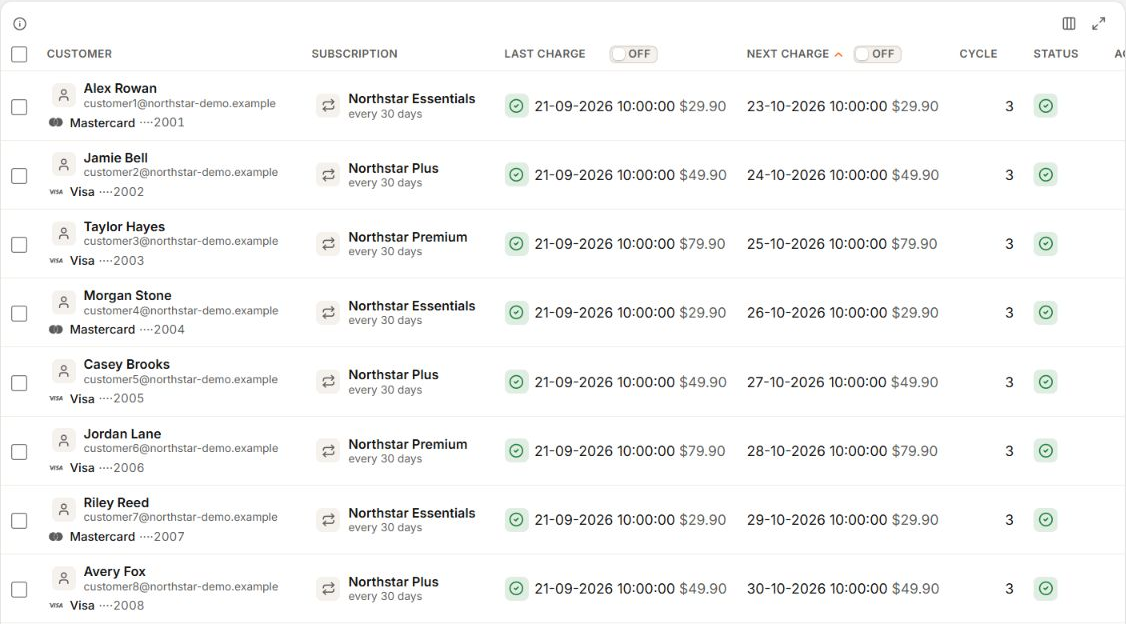
Review daily schedules and act on selected subscriptions. Pause, resume or cancel billing without losing the history behind the customer relationship.
Set the introductory and recurring stages, then inspect the charge simulation. A trial, delay or repeating cycle should have an explicit amount and date logic.
The first twelve charges show the customer commitment your plan creates.
Use the schedule to see charges ahead. Apply the relevant retry profile and routing constraints to recurring payments instead of treating them as unrelated new orders.
Customer actions such as pausing or cancellation remain part of the subscription lifecycle.
Follow membership, churn, cycle retention and recurring product revenue. Investigate whether a change comes from payment outcomes or from the customer lifecycle.
The subscription report uses actual price points so different offers can be evaluated separately.
Give recurring revenue an operating rhythm your team can follow, from the customer’s original choice through the charges and actions that come after it.
Combine introductory amounts and delays with an ongoing recurring interval.
Preview twelve charges using the billing engine’s own calculation.
Pause, resume, cancel and explicitly bill eligible subscriptions or scheduled entries.
Review membership, MRR, churn, cycle retention and revenue by product.
Define the price, introductory cycles and recurring interval.
Present the terms and customer choice at checkout.
Review upcoming charges and manage the lifecycle.
Yes. Advanced plans define introductory cycles before the recurring price and interval. The builder previews the resulting charge sequence.
Existing subscriptions keep the plan copied when they were created. Product plan edits apply to new subscriptions; other operational settings have their own defined update behavior.
The documented recurring enrollment flow uses eligible NMI card sales. Apple Pay and Google Pay sales do not automatically enroll through that card-on-file path.
Yes. The schedule simulation previews twelve charges using the billing engine’s own calculation.
Yes. Lifecycle actions include pause, resume and cancel, with explicit billing actions for eligible subscriptions or schedule entries.
Use subscription schedules to inspect the charges ahead and manage the relevant entries.
Subscription blocks present the selected offer, price, interval and first-charge timing beside the customer’s choice.
Yes. Recurring constraints, account selection and the applicable retry profile are part of the payment setup.

Let’s connect your checkout, payments and recurring revenue.
See what your operation could look like.