Submit the payment. Read the status.
Create a payment from your own application and retrieve its result. Keep the transaction identifier available to the systems that need the confirmed outcome.

Use the payment and administration APIs to build the experience your business needs without losing the record behind it.
Create a payment from your own application and retrieve its result. Keep the transaction identifier available to the systems that need the confirmed outcome.
Use the 3D Secure session endpoints when a browser step is required. Coordinate the next action and status within your purchase experience.
Manage supported stores, products, checkouts, routing and subscriptions with an admin key. Discover checkout blocks, manage revisions, preview and publish documents.
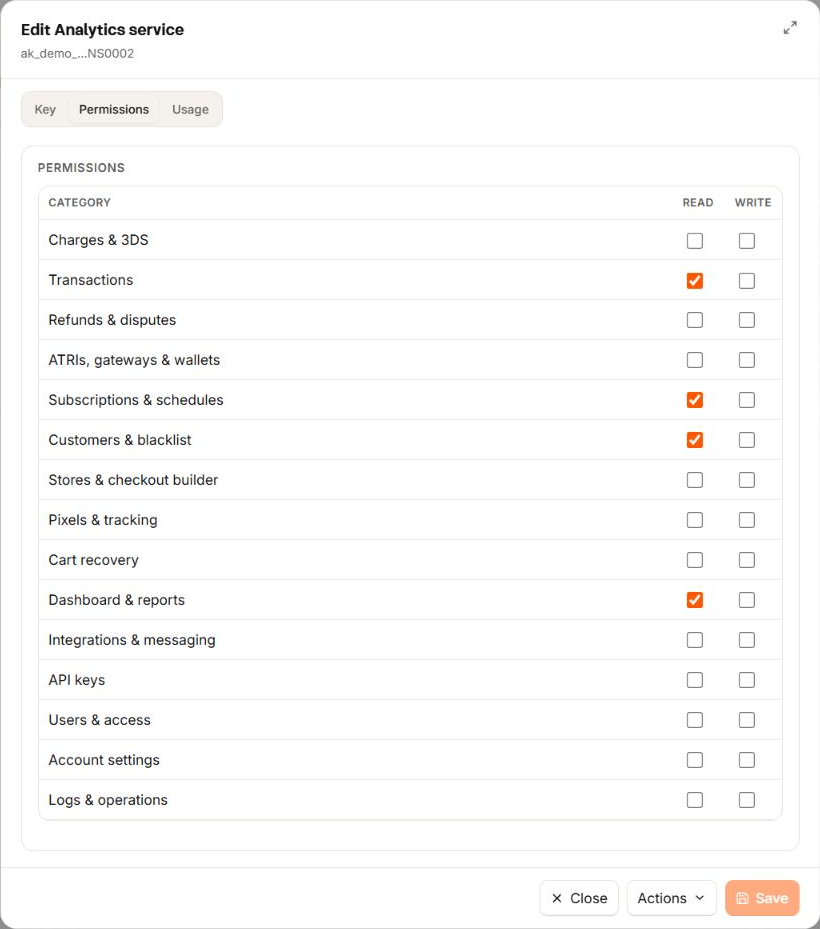
Choose category-level read and write permissions. Administrative mutations are attributed to the key in the action log, so automation retains an operating history.
Separate charge access from supported administration. Limit category read and write scopes to the operations your integration actually needs.
Keys operate within their account; a broader scope does not turn them into cross-account credentials.
Submit a charge, follow its status and handle authentication when required. Connect the outcome to your order or service workflow using the documented contract.
Use documented authentication and endpoint examples when implementing the payment path.
Read transactions and aggregate reporting, or manage commerce configuration through supported admin operations. Use the action log when investigating a change made by a key.
Checkout document revisions, previews and publication give automation a structured editing lifecycle.
Build around your customers and connect the payment, configuration and reporting operations through explicit, scoped API access.
Submit charges and inspect transaction status.
Coordinate supported browser authentication through the session API.
Use charge keys for payments/read-report access and admin keys for administration.
Manage supported resources and retrieve account-scoped data.
Operate enabled modules with account-scoped APIs and inspect configured deliveries at account, checkout or own-link scope.
Create the key type appropriate for the integration.
Connect payment, administration or reporting endpoints.
Follow status and action history from your own system.
POST /v1/chargeGET /v1/charge/orders/:orderIdPOST /v1/3ds/sessionsGET /admin/editor/catalog?pageType=checkoutNo. Charge keys are separated from admin keys. Use a dedicated admin key for supported administrative endpoints.
Yes. The documented API includes the checkout catalog, document revisions, previews and publishing, plus supported store and product operations.
Yes. The charge API supports payment submission, with separate status access to follow the resulting transaction.
Yes. The supported authentication-session API lets your interface coordinate the required browser action and follow its status.
Yes. Charge keys serve payment and supported read/report access. Admin keys are used for administrative operations.
Yes. Supported category read and write scopes define which account-level resources an integration may access.
Supported reporting endpoints return account-scoped data, subject to the key’s access configuration.
The reference is available at app.kontrolcheckout.com/docs/llm.md. Use it to confirm endpoint inputs, authentication and supported operations.

Let’s connect your checkout, payments and recurring revenue.
See what your operation could look like.