Start with a trusted alert source.
Configure XCaliber or RCVR with credentials and a webhook secret. Incoming alerts are checked against the account’s enabled integration.

Connect the incoming dispute signal to the original approved payment and the refund decision that follows.
Configure XCaliber or RCVR with credentials and a webhook secret. Incoming alerts are checked against the account’s enabled integration.
Use the available transaction and order identifiers to find an eligible approved payment. Keep the alert in the context of the sale it concerns.
Leave automatic refunding off to record alerts for review. Enable it when matching alerts should enter the shared refund workflow.
Distinguish a recorded alert from a completed refund, an already refunded payment or a refund failure. Follow-up starts from the actual status.
Connect the supported alert service and decide whether matching alerts should be reviewed or automatically refunded. Keep that decision explicit in the integration.
The webhook secret and account configuration identify the source entering the workflow.
An alert needs an eligible approved transaction before a refund can be considered. Use the original payment context when the team investigates the record.
Available order and transaction identifiers support the matching process.
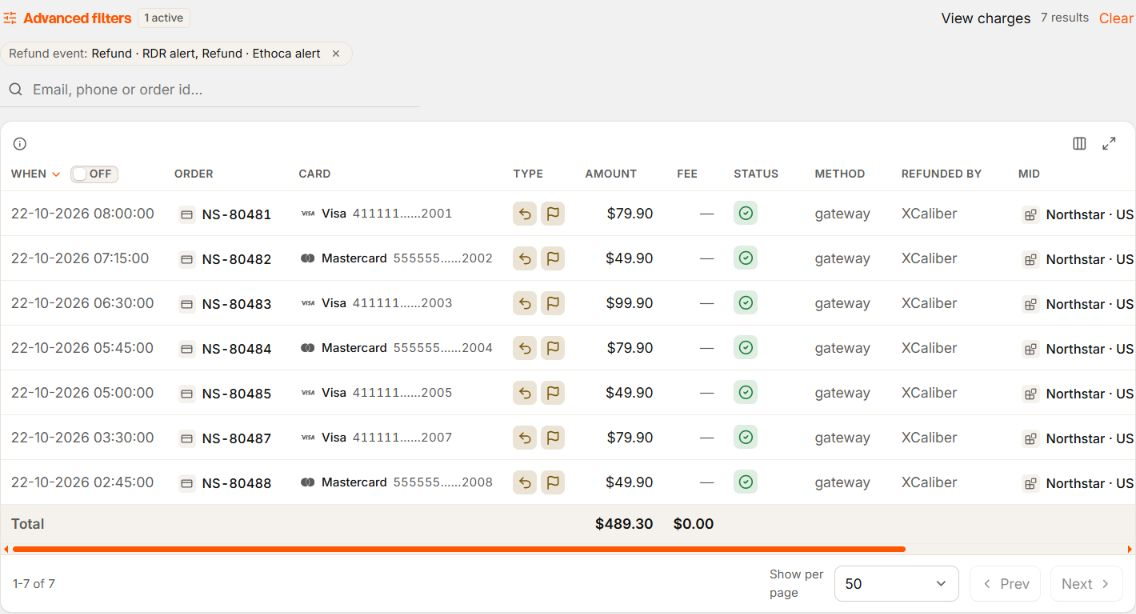
Read whether the payment was refunded, was already refunded or encountered a failure. An alert being received is different from the requested action being completed.
The shared refund workflow keeps alert-driven actions connected to normal refund operations.
Bring supported alerts into the transaction workflow so the response and its outcome can be followed in one operating context.
Receive XCaliber and RCVR alerts through authenticated webhooks.
Associate alerts with eligible transactions in the account.
Choose recording only or automatic refund handling.
Review outcomes and open the linked transaction.
Connect the provider and choose the refund policy.
Match incoming alerts to payment records.
Review the action and refunds that need attention.

Only when you enable automatic refunds for the integration and the alert matches an eligible transaction. With the setting off, alerts are recorded for review.
Kontrol records the alert as unmatched. It does not issue an automatic refund without a matching transaction.
No. These tools support your alert and refund operation. Alert coverage, timing and dispute outcomes depend on the provider, the transaction and the relevant payment parties.
Yes. The shared refund workflow can apply your account's blacklist settings and end subscriptions linked to the refunded order. Review these settings before enabling automatic refunds.
Kontrol supports XCaliber and RCVR alert connections through authenticated webhooks.
Incoming alerts are matched to eligible transaction records within the account.
Action history shows the recorded outcome and links back to the transaction.
No. An incoming alert and a completed refund are separate outcomes. Review the action result and any refund that needs attention.

Let’s connect your checkout, payments and recurring revenue.
See what your operation could look like.