Send a match to the right destination.
Map a BIN or issuer to selected accounts, a processor, an acquirer, an MCC or another pool. Keep card support and available capacity in the final eligibility check.

Separate the cards you want to direct differently from the cards your policy should refuse.
Map a BIN or issuer to selected accounts, a processor, an acquirer, an MCC or another pool. Keep card support and available capacity in the final eligibility check.
Use a refusal profile when a matching card should not proceed. Apply the rule to initial sales, recurring charges or both.
Attach the same mapping or scrubbing profile to the pools that need it. Maintain the card policy centrally instead of recreating it for each route.
Read the matched rule and card context in the decision log. Per-rule analytics connect the policy to the orders it affected.
A mapping rule chooses a route. A scrubbing rule stops an attempt. Keeping those actions separate makes a profile easier to review and safer to change.
Set the intended initial-payment or recurring scope before applying a refusal profile.
Specific BIN matches take priority over issuer matches. Position orders rules of the same match type, so the policy has a defined answer when several entries apply.
Bulk imports can be previewed for invalid values, contradictions and shadowed rules.
Follow the selected rule through the decision log and per-rule reporting. Use that evidence to refine the profile rather than guessing from an aggregate decline rate.
CSV import supports append or replace when your policy changes at scale.
The rules your team learns belong in reusable profiles, with enough detail to understand their effect and change them deliberately.
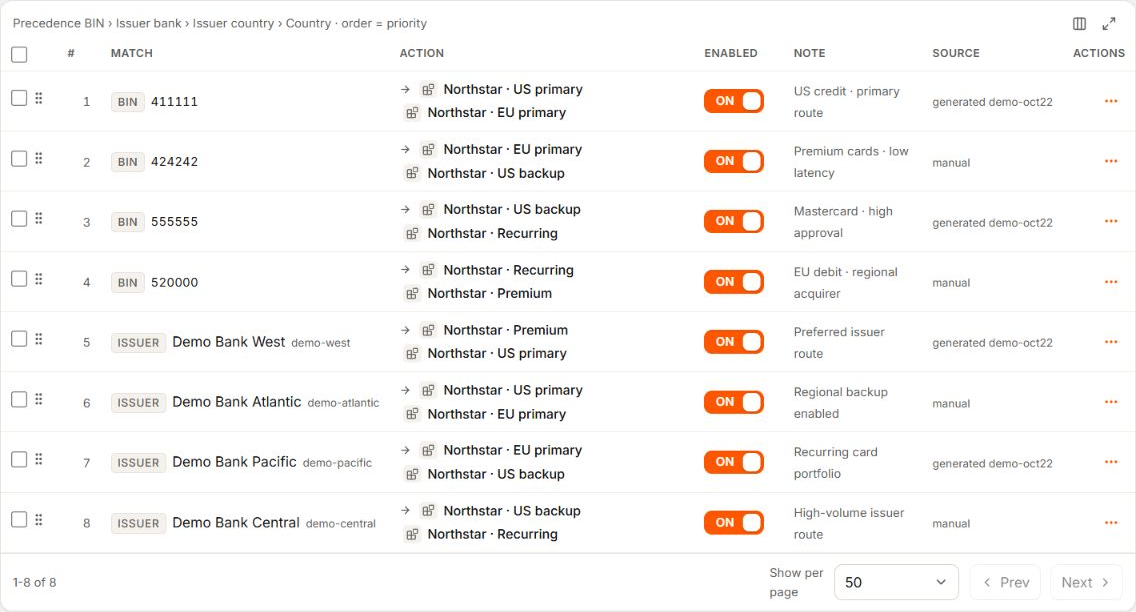
Maintain mapping and scrubbing profiles for your routing pools.
Specific BIN matches take priority over issuers; position ranks the same match type.
Choose initial payments, rebills or both.
Preview CSV imports and choose append or replace.
Create the profile with the matches and actions you need.
Assign it to a routing pool.
Review the decision log and per-rule payment outcomes.
Mapping directs eligible charges toward selected accounts or a routing pool. Scrubbing refuses matching charges before any merchant account is attempted.
BIN matches take priority over issuer matches, followed by issuer country and customer country. Position ranks rules within the same match type.
No. Monthly caps, supported card brands and cascade rules still apply. If a mapped target pool has no eligible candidate, the routing engine can fall back to the broader eligible pool.
Yes. Maintain mapping and scrubbing profiles, then assign the required profiles to the relevant routing pools.
Yes. Scrubbing scope can target initial payments, rebills or both.
Yes. Preview the CSV import and choose whether to append to the existing profile or replace its contents.
Mapping controls cover MIDs, processors, acquirers, MCCs and pools. Choose a target supported by the payment configuration.
Review the decision log and per-rule payment outcomes to see which rule applied and what happened afterward.

Let’s connect your checkout, payments and recurring revenue.
See what your operation could look like.