Pages built for their purpose.
A collection helps shoppers explore. A product page explains a specific offer. Choose separate block arrangements for home, collection, product and content pages.

Give every store page a job without maintaining a different design system for each one.
A collection helps shoppers explore. A product page explains a specific offer. Choose separate block arrangements for home, collection, product and content pages.
Set shared colours, fonts and the page shell once. Refine an individual block when a page needs a different rhythm or a more prominent message.
Review the store with an actual product instead of a generic placeholder. See how product details and imagery work in the page you are building.
Connect the store to the checkout profile that fits the offer. Keep the purchase step in the same commerce operation as the storefront that introduced it.
Choose the theme, heading and body fonts, colours and shared shell. These decisions give new pages a consistent starting point.
Change the visual system in the theme rather than patching each page separately.
Choose the relevant page type, add or reorder blocks and adjust their variants. Disable an element while you consider a simpler layout.
Use page-specific templates for the home, collection, product and content experience.
Check the desktop and phone views with store content before saving. Then review the assigned checkout as the next step in the same purchase.
Keep the storefront promise and the order summary consistent.
A maintained theme gives your team a base for the next product or page, with room to adapt the presentation where the offer needs it.
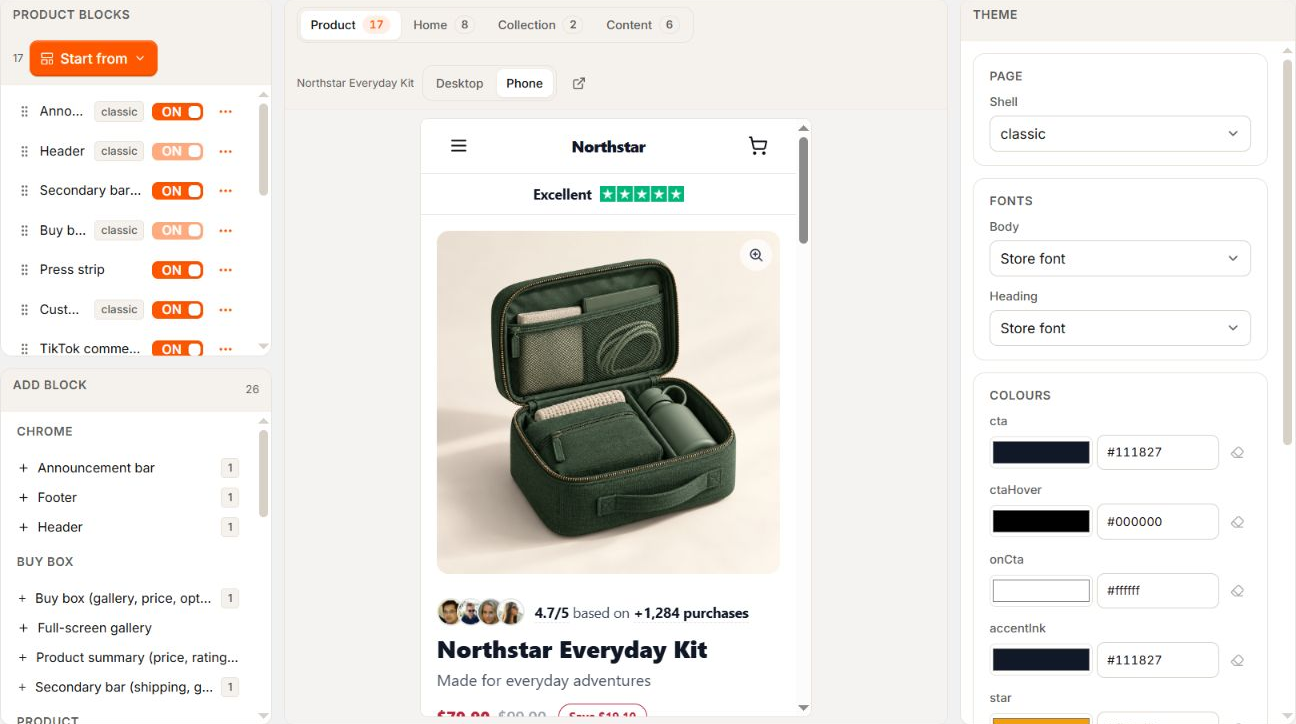
Edit product, home, collection and shared content layouts.
Start with a block arrangement, then reorder, disable, remove or add blocks.
Set colours, heading/body fonts, sizes and the page shell.
Review actual catalog content in desktop and phone views.
Choose a base theme and a starting layout for each page.
Arrange blocks and set your theme identity.
Review the draft with store content, then save the theme.
The theme builder covers product pages, the store home, collections and supporting content layouts used for contact, tracking, policies and the store's not-found page.
Yes. The builder saves work in progress as a draft and previews it with the storefront renderer. Saving the finished theme applies it to the stores using that theme.
Yes. A custom theme belongs to your account and can be assigned to multiple native Kontrol stores. The theme builder applies to these stores; Shopify storefront themes stay in Shopify.
Yes. Theme settings control shared colours, heading and body fonts, sizes and the page shell.
Yes. Choose a starting template for the page type, then add, reorder, disable or remove its blocks.
The preview renders actual store and product content through the storefront renderer, so the layout can be reviewed in context.
Yes. Review both desktop and phone views before saving the theme.
The Store Builder handles storefront page layouts. The visual Checkout Builder handles the purchase and payment page; you connect the published checkout to the store.

Let’s connect your checkout, payments and recurring revenue.
See what your operation could look like.